
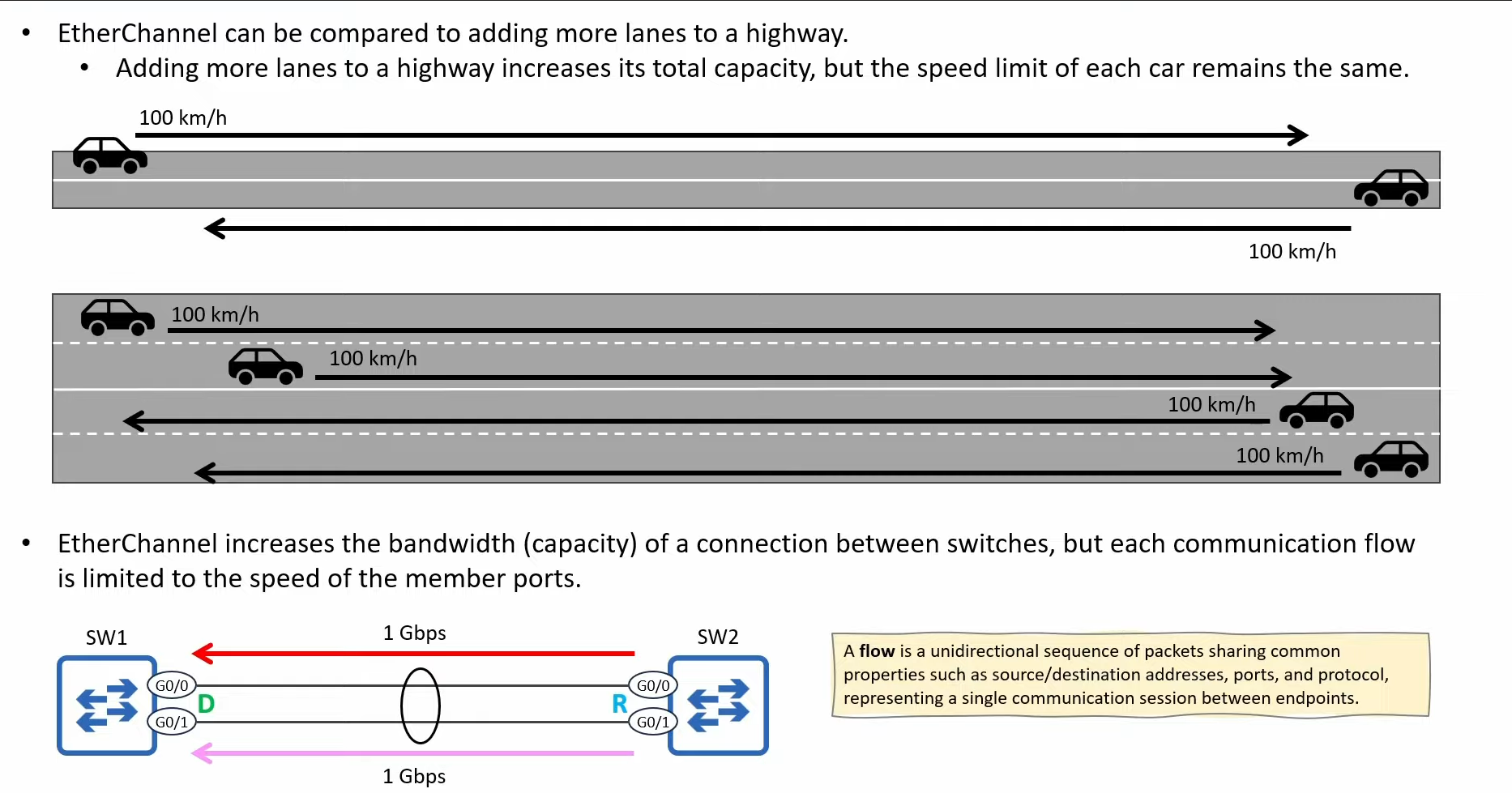
EtherChannel is Cisco’s implementation of Link Aggregation (LAG), bundling multiple physical links into one logical connection called a Port-Channel interface.
Purpose
- Increased bandwidth
- Redundancy
- One STP link (prevents loops)
Hardware limitations (ASIC)
- All member links must have the same speed
- Typically 16 interfaces supported – but only 8 active
- Maximum: 8 active links per Port-Channel
- All links are treated as one logical port
EtherChannel protocols
| Protocol | Type | Standard |
|---|---|---|
| PAgP | Cisco proprietary | Cisco only |
| LACP | IEEE 802.3ad | Open standard |
| ON | No protocol | Not recommended |
⚠️ Cisco best practice: always use active on both sides with LACP.
Activation modes
- ON (forced): no negotiation, not detectable by STP, can cause Layer 2 loops. ❌ Cisco does not recommend
on. - PAgP (Cisco): Desirable / Auto · proprietary · Cisco devices only
- LACP (standard): Active / Passive · IEEE standard · supported by most vendors
Requirements for forming an EtherChannel (all MUST match)
- Interface type – all Layer 2 or all Layer 3
- Speed
- Duplex
- Switchport mode – access or trunk
- Access VLAN (if access)
- Allowed VLAN list (if trunk)
- Native VLAN (if trunk)
- Channel-group number
- EtherChannel protocol – LACP / PAgP / ON
PAgP negotiation table
| Local \ Remote | Desirable | Auto | On |
|---|---|---|---|
| Desirable | ✅ Up (negotiates) | ✅ Up (negotiates) | ⚠️ Up (forced) |
| Auto | ✅ Up (negotiates) | ❌ Down | ⚠️ Up (forced) |
| On | ⚠️ Up (forced) | ❌ Down | ❌ Down |
👉 Rule: always have desirable on at least one side – preferably on both.
LACP negotiation table
| Local \ Remote | Active | Passive | On |
|---|---|---|---|
| Active | ✅ Up (negotiates) | ✅ Up (negotiates) | ⚠️ Up (forced) |
| Passive | ✅ Up (negotiates) | ❌ Down | ⚠️ Up (forced) |
| On | ⚠️ Up (forced) | ❌ Down | ❌ Down |
Cisco memory rules (exam & operations)
- EtherChannel = one STP link
- LACP active/active = best practice
oncan create loops- Load balancing ≠ per-packet (it is hashing)
- PAgP: at least one side Desirable · LACP: at least one side Active · On: never negotiates
Common faults
| Fault | Result |
|---|---|
| VLAN mismatch | Interface suspended |
| Speed/duplex mismatch | No bundle |
| Passive + Passive (LACP) | No adjacency |
| ON on one side | Loop risk |
| STP on the physical interface | Ignored |
Configuration
Create L2 EtherChannel (best practice – configure L2/L3 parameters before channel-group, otherwise members can be suspended):
conf t
interface range gi1/0/1-2
 switchport
 switchport mode trunk
 channel-group 1 mode active
Layer 3 EtherChannel (routed Port-Channel, typical in distribution/core):
conf t
interface range gi1/0/3-4
 no switchport
 channel-group 2 mode active

interface port-channel 2
 ip address 10.10.10.1 255.255.255.252
The Port-Channel is the master interface – all STP, QoS, ACL and VLAN config goes here; members inherit:
interface port-channel 1
 description Uplink_to_Core
 switchport mode trunk
 switchport trunk allowed vlan 10,20,30
 spanning-tree portfast trunk
Removing an EtherChannel safely (avoids STP flaps in production):
interface port-channel 1
 shutdown

interface range gi1/0/1-2
 no channel-group 1
LACP details (CCNP)
lacp system-priority 100        ! lower = higher priority; decides who controls active vs standby links

interface gi1/0/1
 lacp port-priority 100         ! used when >8 links are configured; lowest value becomes active

interface port-channel 1
 lacp max-bundle 4              ! CCNP classic: only 4 active links, the rest standby
Load balancing (advanced)
port-channel load-balance ?
show etherchannel load-balance
Typical methods: src-mac, dst-mac, src-dst-mac, src-ip, dst-ip, src-dst-ip, src-dst-port (platform dependent). Never per-packet – it would break TCP ordering.
Cisco’s recommendation: src-dst-ip – better distribution than MAC-only hashing, preserves flow consistency (same flow → same link), fits L3-dominated enterprise networks. src-dst-port gives the best distribution (L4) but is platform/ASIC dependent and mostly used in datacenter designs.
| Method | Cisco assessment |
|---|---|
src-mac |
❌ Limited |
dst-mac |
❌ Limited |
src-dst-mac |
⚠️ OK in L2 |
src-ip |
⚠️ OK |
dst-ip |
⚠️ OK |
src-dst-ip |
✅ Recommended (default best practice) |
src-dst-port |
🚀 Best – but platform dependent |
🧠 CCNP rule: if Cisco asks “which load-balancing method is recommended” → answer src-dst-ip.
Troubleshooting (CCNP)
show etherchannel summary
show lacp neighbor
show lacp internal
show interfaces port-channel 1
show interfaces gi1/0/1 etherchannel| Flag | Meaning |
|---|---|
P |
Bundled (active) |
S |
Standby |
I |
Individual (not bundled) |
D |
Down |
s |
Suspended |
U |
Port-channel up |