
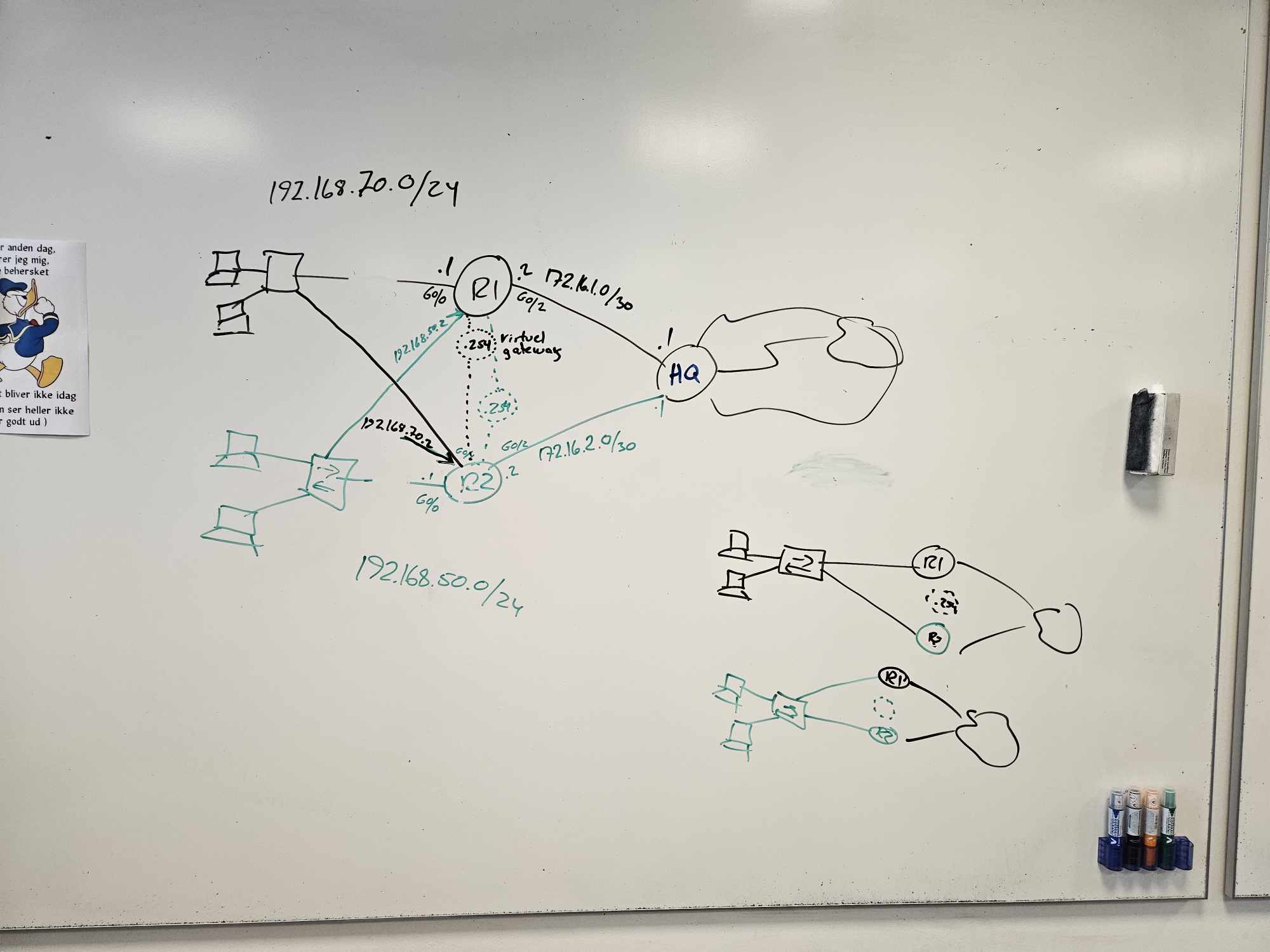
HSRP (Hot Standby Router Protocol) creates redundancy between routers by assigning a virtual IP and MAC address. One router is active, others standby; if the active fails, the standby takes over automatically, minimizing downtime.
Facts
| Topic | HSRP |
|---|---|
| Standard | Cisco proprietary |
| Multicast address | 224.0.0.2 (v1) / 224.0.0.102 (v2) |
| Transport | UDP 1985 |
| Virtual address | One virtual IPv4 per group |
| Virtual MAC | 0000.0c07.acXX |
| Roles | Active / Standby |
| Priority | 100 (range 0–255) |
| Timers | Hello 3 s / Hold 10 s |
| Versions | v1 (groups 0–255), v2 (groups 0–4095) |

Key terms
- Virtual IP: an address from the local subnet used as default gateway for all hosts
- Virtual MAC: auto-generated: first 24 bits Cisco (0000.0c), next 16 HSRP ID (07.ac), last 8 = group number in hex – group 10 →
0000.0c07.ac0a - Hello messages: exchanged every 3 s between active and standby, telling the state
- Hold timer: default 10 s (~3× hello) – how long the standby waits before taking over
- Priority: default 100; the higher priority becomes active
- Preempt: the standby automatically becomes active when it has higher priority
When to use / avoid
- Use: two or more Cisco routers/L3 switches, clients need one stable gateway, simple proven redundancy over load balancing – access/distribution layer
- Avoid: multivendor environments, when standards are required, or when gateway load must be actively distributed
- Pros: very stable and mature, easy to understand (CCNA-friendly), great Cisco integration · Cons: proprietary, only one active at a time, no built-in load balancing
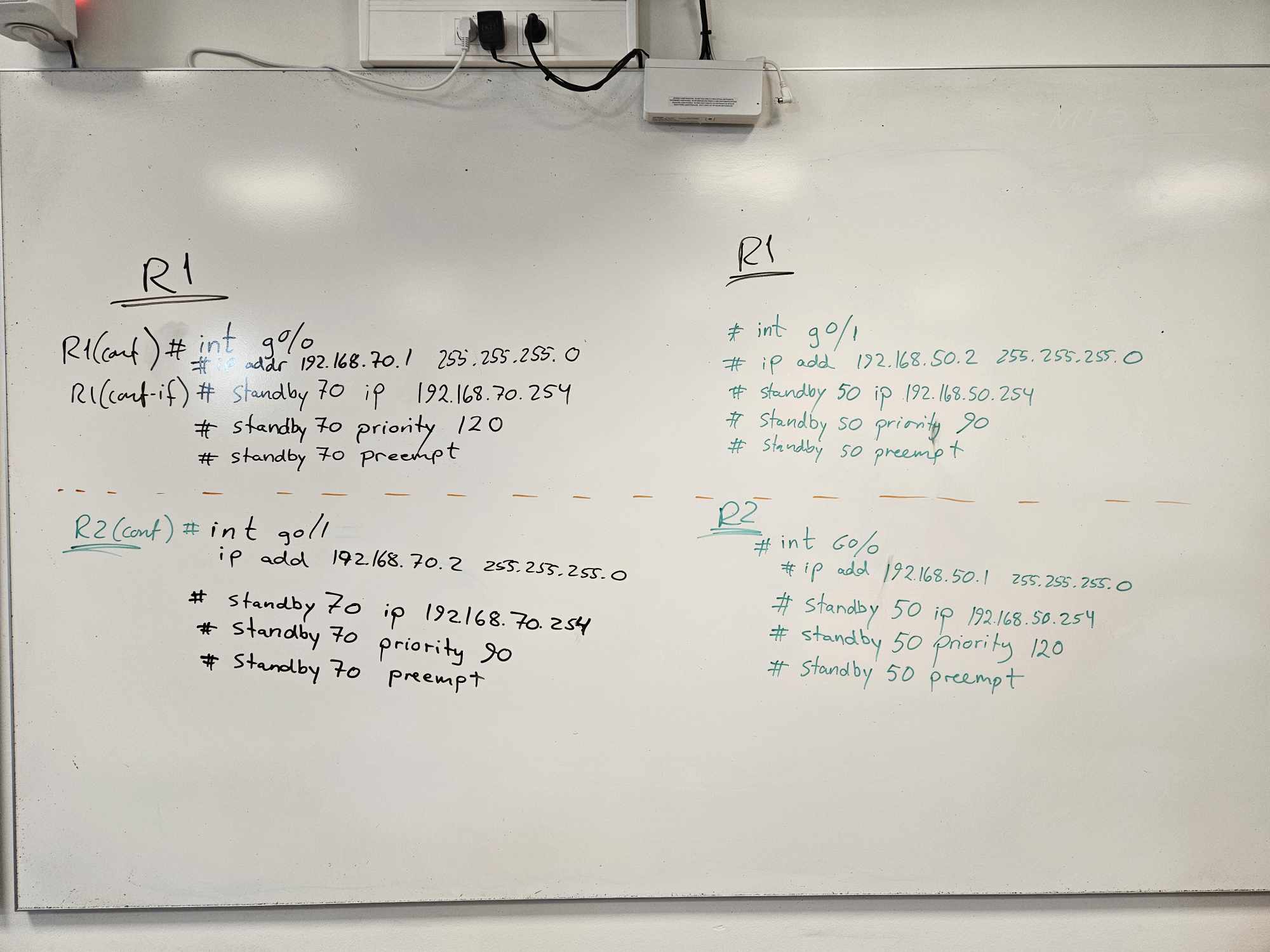
Basic configuration (CCNA)
Scenario: VLAN 10, virtual gateway 10.10.10.254, Router A primary, Router B secondary.
Router A:
interface vlan 10
 ip address 10.10.10.1 255.255.255.0
 standby 10 ip 10.10.10.254
 standby 10 priority 110
 standby 10 preempt
Router B:
interface vlan 10
 ip address 10.10.10.2 255.255.255.0
 standby 10 ip 10.10.10.254
 standby 10 priority 100
 standby 10 preempt
⚠️ Remember the same standby group number on the router pair!
Version:
interface vlan 10
 standby version 2
Preemption (with delay, CCNP):
standby 10 preempt
standby 10 preempt delay minimum 60
Interface tracking (very important – CCNP):
track 1 interface GigabitEthernet1/0/1 line-protocol
interface vlan 10
 standby 10 track 1 decrement 20
! if the interface goes down, priority drops by 20
Timer tuning:
standby 10 timers 1 3 ! hello 1 s, hold 3 sAuthentication:
standby 10 authentication mypassword                      ! clear-text (CCNA)
standby 10 authentication md5 key-string mysecretkey      ! MD5 (CCNP)
Multiple HSRP groups (load distribution – CCNP design):
interface vlan 10
 standby 10 ip 10.10.10.254
 standby 10 priority 110
 standby 10 preempt
 standby 20 ip 10.10.10.253
 standby 20 priority 90
 standby 20 preempt
Verification (exam classics)
show standby
show standby brief
show running-config interface vlan 10
show ip interface brief
Output you must be able to read:
State is Active
Virtual IP address is 10.10.10.254
Active router is local
Standby router is 10.10.10.2
Priority 110 (configured 110)
Troubleshooting (step by step)
show standby
show ip interface brief
show standby brief
show track
show running-config | section standby
debug standby        ! with care
undebug all
Typical faults 🚨
| Problem | Cause |
|---|---|
| Wrong active router | Missing preempt |
| No failover | Different group ID |
| Flapping | Different timers |
| Traffic stops on uplink failure | Missing tracking |
| No HSRP adjacency | VLAN mismatch |
| No MAC update | Wrong HSRP version |